BREAKING NEWS
Showing posts with label GOOGLE HACKING. Show all posts

Friday, July 3, 2015

Customize Google to Improve Search Results

Google is undisputedly the best search engine out there on the Internet, however there are a few ways by which you can customize Google and make it even better.
I have got 3 best free Firefox extensions using which you can customize Google by adding extra useful information to your search results and remove unwanted information like ads, spam and click tracking so as to improve the overall searching experience. The following are the 3 best extensions for Firefox using which you can improve the search results.

1. OptimizeGoogle:

Using OptimizeGoogle, you can get rid of text ads from Google search results, add links from about 10 other search engines, add position counter, product results and more. You can even filter your search results to see dead websites (using WayBack Machine) and remove click tracking so that you can search anonymously. Here is a list of some of the other useful features of this plugin:
  1. Use Google suggest (get word suggestion while typing)
  2. Add more security by using https wherever necessary
  3. Filter spammy websites from search results page
  4. Option to remove SideWiki
  5. Add links to bookmark your favorite result
  6. Add links to other news and product search sites
To install the plugin, just visit the OptimizeGoogle page from your Firefox browser and click on the Download button. Once installed, you can enable or disable the customization options from theTools -> OptimizeGoogle Options.
After you customize Google to improve the search results, how about adding a feature that provides a way to preview the website in the search results itself? Here is a miracle Firefox extension to this job for us.

2.  SearchPreview:

SearchPreview (formerly GooglePreview) will insert thumbnail view of the web page into the Google search results page itself so that you can take the guess work out of clicking a link. Just install the plugin, reload Firefox and you will have the SearchPreview at work. You can install this plugin from the following link:
OptimizeGoogle and SearchPreview have made our search results smarter and faster. Now how about safer? Well you have another Firefox plugin to make your search results safer as well. Here we go.

3. McAfee SiteAdvisor:

This is a free browser plugin that gives safety advice about websites on the search results page before you actually click on the links. After you install the SiteAdvisor plugin, you will see a small rating icon next to each search result, which will alert you about suspicious/risky websites and help you find safer alternatives. These ratings are derived based on various tests conducted by McAfee.
Based on the quality of links, SiteAdvisor may display Green, Yellow, Red or Grey icon next to the search results. Green means that the link is completely safe, Yellow means that there is a minor risk, Red means a major risk and Grey means that the site is not yet rated. These results will guide you to Web safety.
SiteAdvisor works on both Internet Explorer and Firefox which you can download from the following link:
Here is a snapshot of all the 3 plugins at work:
Custom Google Search Results
I hope you enjoy these 3 plugins which make your searching experience a lot more simpler and safer

Use One Gmail Account to Send Emails from Multiple IDs

n this post, I am going to show you how to use your Gmail account to send and receive emails from multiple addresses. Most of us own more than one email account say for example, one from Gmail, one from Yahoo and one from Hotmail. If you are tired of logging into multiple accounts to check your inbox or send emails, I have a solution here.
Gmail has an option to integrate multiple email accounts (email addresses) into a single Gmail account. Once you integrate multiple email addresses into your Gmail account, you can use the same account to send and receive emails for different email addresses you have. Let’s take a simple example.
Suppose you have three email addresses (email accounts):
  1. john@gmail.com
  2. john@yahoo.com
  3. john@hotmail.com
You can integrate the emails john@yahoo.com and john@hotmail.com to john@gmail.com and operate all the three accounts from your single gmail account. Here is a step-by-step procedure to do this:
  1. Login to your gmail account.
  2. Click on Settings at the top right corner.
  3. Under Settings, click on the  Accounts tab.
  4. Now you’ll see the first option “Send mail as:“
  5. Under this option, click on Add another email address you own.
  6. Now a small new window will pop-up asking you to enter the details of your new email address.
  7. Here you can enter any name and any email address. The email address need not belong to gmail only. You can enter your yahoo, hotmail or any other valid email address.
  8. A Verification email will be sent to the address that you specify. Once you verify that you own the email address, it will be integrated to your Gmail account.
Now, when you compose a new email, you’ll see an option to select from multiple address to send the mail. Also you’ll receive the incoming mails for multiple addresses to a single mailbox. I hope this will benefit you.
Before you leave, I should also tell you one good advantage of this. According to Gmailprivacy policy, they will not send the user’s IP address in the outgoing emails. That means, when you send an email from your Gmail account , the receiver will not be able to find out your IP address. But you do not have this advantage in Yahoo or other email providers.
Please share your opinions through comments. I hope this helps….

Wednesday, July 1, 2015

How to Nab Free eBooks Using Google

Google Dorking Queries

First, I'm going to show you the filetype query. I want to find the thinkkspy ebook, a book on Python programming. Enter the following in a Google search bar:
    thinkcspy filetype:pdf
And you should get (click on the image to enlarge):
How to Get Ebooks for Free
The filetype:pdf parameter tells Google to filter out every search result that doesn't have a file extension ending with ".pdf". The same goes for any other filetype. This a good trick to keep in your arsenal.
Now let's filter out via URL. A good site that shares free ebooks is 4shared. Let's try to get books only from there. Run this through your search:
    thinkcspy inurl:4shared
This will yield these results:
How to Get Ebooks for Free
As you can see, this brings up many links, the results are exactly what we want. Google filtered them perfectly. So from that, I hope you can find some great eBooks, and put them where they belong, in your brain! Visit the rest of us Byters in the IRC.

Warnings

  • Null Byte is not condoning piracy. Download free books that are free. This means if you come across a book that you know costs money, don't download it. Some books are indeed free, and Amazon just wants you to buy from them.

How to Hack CCTV Private Cameras

Hi Friends.
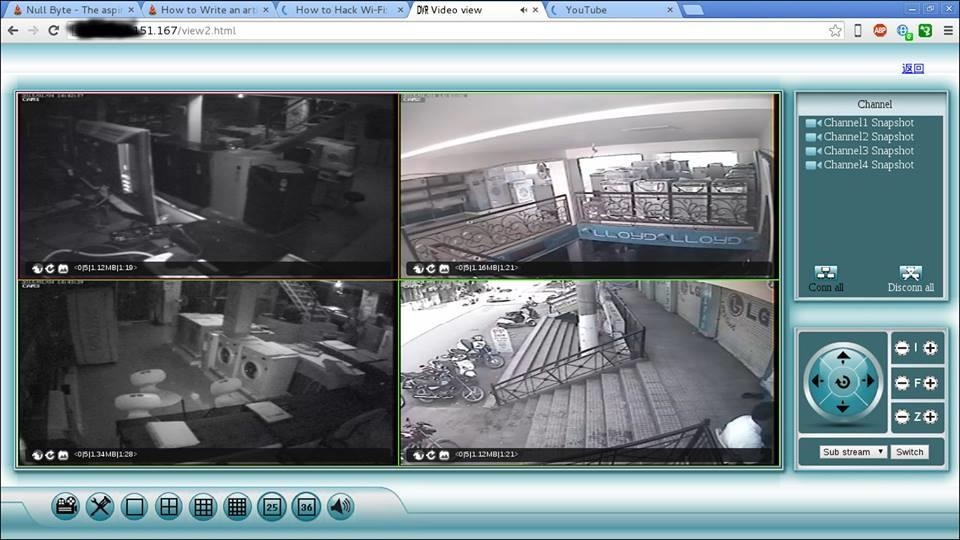
Now a days CCTV cameras are used many place like shops, malls, offices, warehouse etc and more. for security reason and for many more purposes. This articles show you how to hack CCTV cameras. If search on Google for CCTV camera hacking , you will be find tricks for public CCTV camera hacking tricks. But here you will be hack private CCTV cameras
Image via fbcdn.net
.

Step 1: Download Angry Ip Scanner

Angry Ip scanner is powerful GUI Port scanner . Angry Ip scanner available for all major OS.
Download and Install Angry ip scanner

Step 2: Choose Ip Address Range

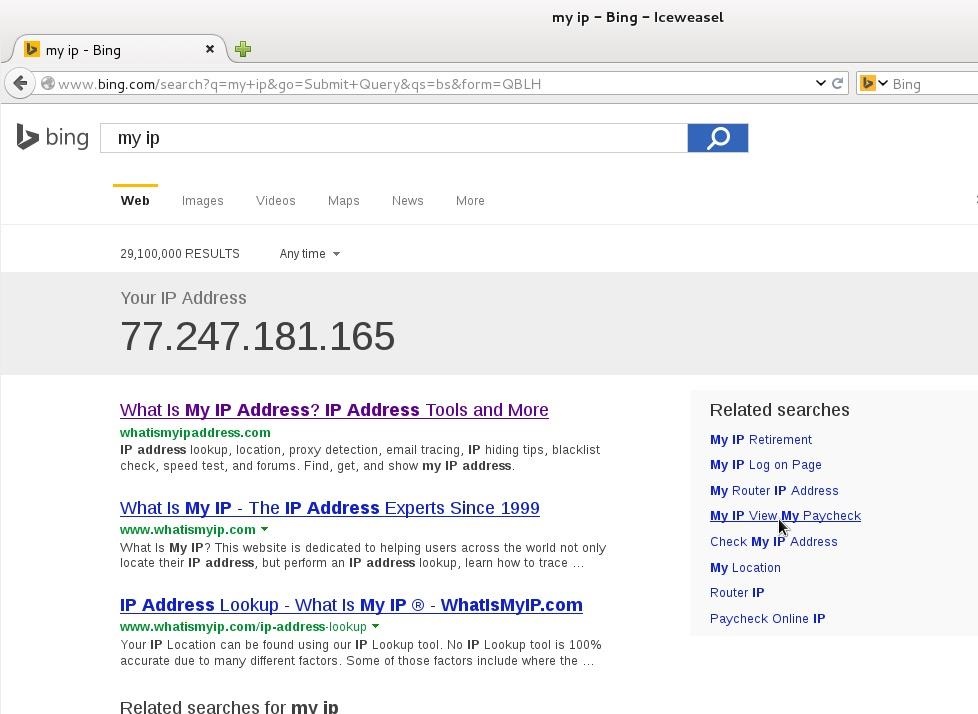
Its important that how to choose proper ip address range for CCTV camera hacking. CCTV cameras are connected with broadband internet connection. If your accessing broadband router then find your public ip address. Just type 'My IP' in Google or Bing search bar. Google will show your public ip address
Here 77.247.181.165 is my public ip . So ip range can be 77.247.181.1 o 77.247.181.255 or 77.247.181.1 o 77.247.185.255

Step 3: Configure Angry Ip for CCTV Camera Hacking

Open Angry Ip Scanner
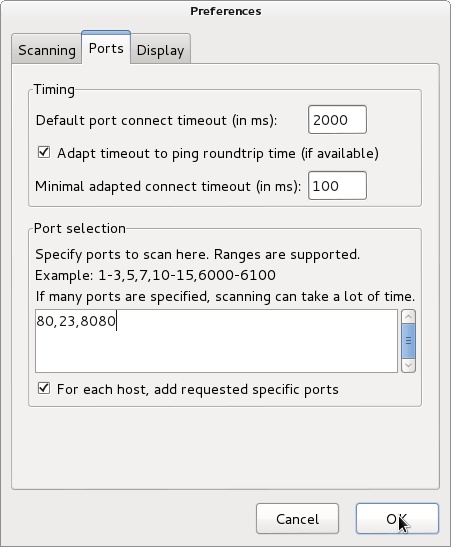
Go to tools > Preferences > Ports | add ports 80,8080,23 in Port selection tab
It will scan 80,8080 and 23 port.
We need add web detect. Web detect can show short details about device details connected to internet. like as follow
  1. CCTV camera model name
  2. CCTV camera name
  3. router name or router model name
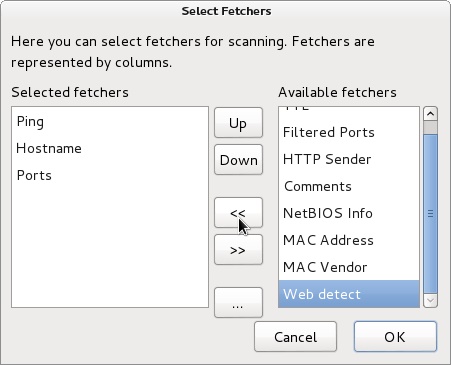
Add web detect as follows
Go to Tools > Fetchers > add (<<) web detect
Click OK

Step 4: Start Ip Range Scanning

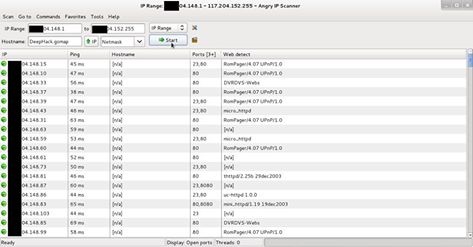
Add ip range in Ip range tab and click start
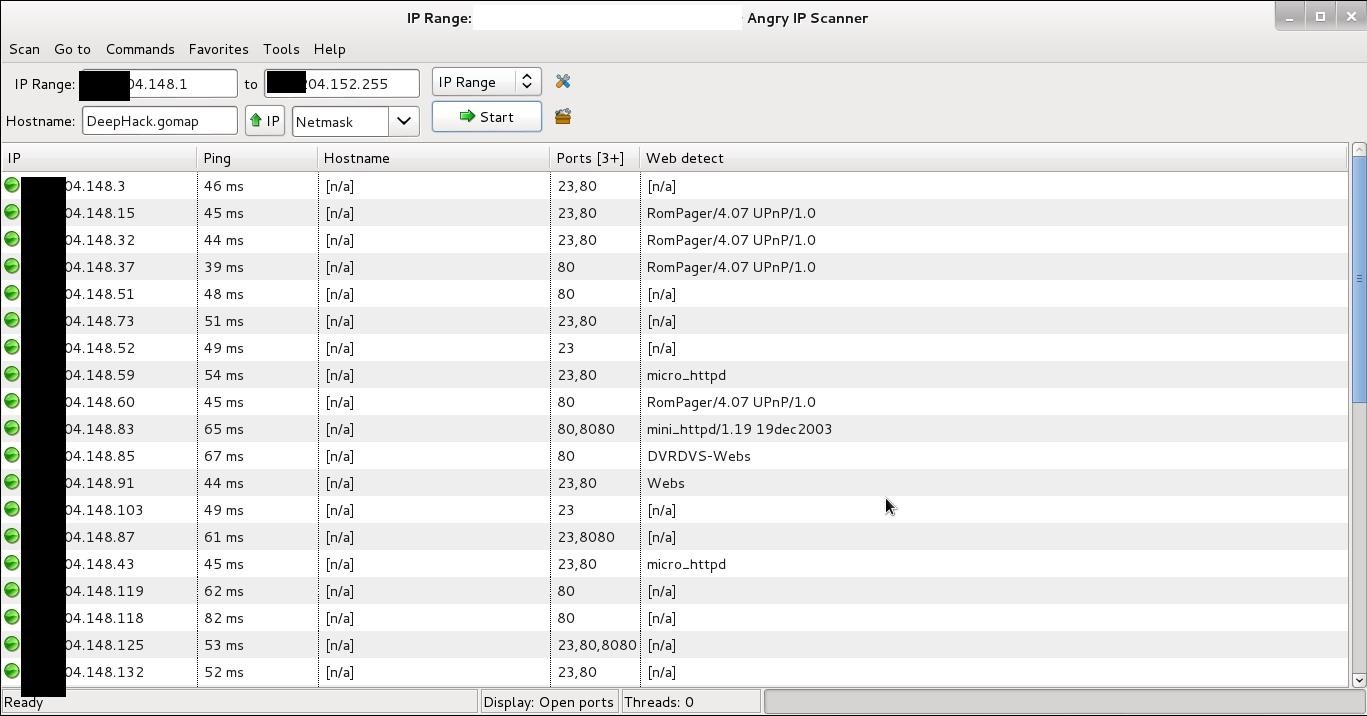
Image via fbcdn.net
After scanning finished you will find interesting information in web detect tab some examples as follows
  1. RomPager/4.07 UPnP/1.0 ----- router
  2. uc-httpd 1.0.0 ----- CCTV camera
  3. DVRDVS-Webs ----- CCTV camera
  4. microhttpd ----- router
  5. Webs ----- CCTV camera
  6. Hikvision-Webs ----- CCTV camera
  7. iBall-Baton ----- CCTV camera
Copy ip address of detected CCTV camera and pest in browser press enter.

Step 5: Default Username and Password

Most of the CCTV cameras and router configured default username and password. example
Username : admin | password : admin
Username : admin | password : (blank password)
Username : admin | password : 12345
Username : admin | password : 9999
You can find default username and password list trying some googling
some CCTV cameras need plugin, you can download from same page. If not found plugin at same page then go to manufacture website site and download it.

Step 6: Crack CCTV Camera Password Using Hydra

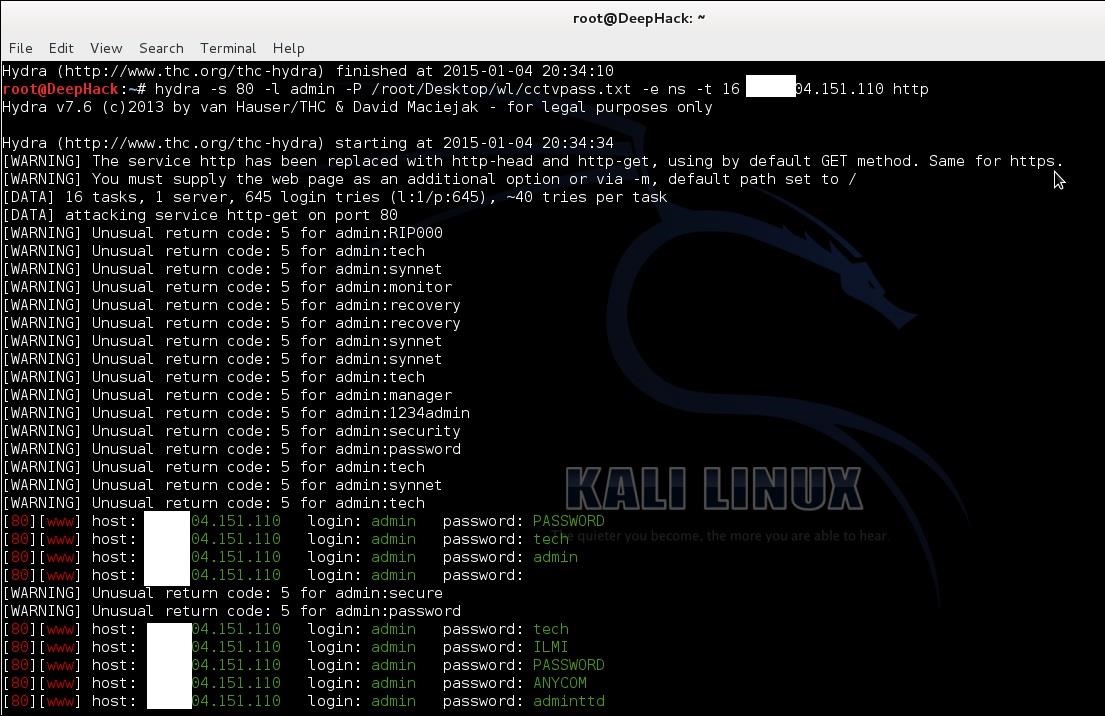
If default password not work then we need to crack it. hydra is powerful brute for tool can crack CCTV cameras password.
Now fire up kali
root@DeepHack:~# hydra -s 80 -l admin -P /root/Desktop/wl/cctvpass.txt -e ns -t 16 targetIP http*
Hydra syntax
-s 80 -- define port number
-l admin -- default login name admin
-P /root/desktop/worldlist.txt -- choose your word list for brute force
-e --- empty password
ns --- try login as passwordand try empty password
http --- port name for attack
Using these can hack CCTV cameras

Step 7: Warnning

This article is only for education purpose . Aim of these article is that how can secure cctv cameras using strong passwords. Do not use for criminal or another black art purpose. I am not responsible for that.

Google Hacking

Google queries for locating various Web servers
“Apache/1.3.28 Server at” intitle:index.of
Apache 1.3.2
“Apache/2.0 Server at” intitle:index.of
Apache 2.0
“Apache/* Server at” intitle:index.of
any version of Apache
“Microsoft-IIS/4.0 Server at” intitle:index.of
Microsoft Internet Information Services 4.0
“Microsoft-IIS/5.0 Server at” intitle:index.ofMicrosoft Internet Information Services 5.0
“Microsoft-IIS/6.0 Server at” intitle:index.of
Microsoft Internet Information Services 6.0
“Microsoft-IIS/* Server at” intitle:index.of
any version of Microsoft Internet Information Services
“Oracle HTTP Server/* Server at” intitle:index.of
any version of Oracle HTTP Server
“IBM _ HTTP _ Server/* * Server at” intitle:index.of
any version of IBM HTTP Server
“Netscape/* Server at” intitle:index.of
any version of Netscape Server
“Red Hat Secure/*” intitle:index.of
any version of the Red Hat Secure server
“HP Apache-based Web Server/*” intitle:index.of
any version of the HP server
Queries for discovering standard post-installation
intitle:”Test Page for Apache Installation” “You are free”
Apache 1.2.6
intitle:”Test Page for Apache Installation” “It worked!” “this Web site!”
Apache 1.3.0 – 1.3.9
intitle:”Test Page for Apache Installation” “Seeing this instead”
Apache 1.3.11 – 1.3.33, 2.0
intitle:”Test Page for the SSL/TLS-aware Apache Installation” “Hey, it worked!”
Apache SSL/TLS
intitle:”Test Page for the Apache Web Server on Red Hat Linux”
Apache on Red Hat
intitle:”Test Page for the Apache Http Server on Fedora Core”
Apache on Fedora
intitle:”Welcome to Your New Home Page!”
Debian Apache on Debian
intitle:”Welcome to IIS 4.0!”
IIS 4.0
intitle:”Welcome to Windows 2000 Internet Services”
IIS 5.0

intitle:”Welcome to Windows XP Server Internet Services”
IIS 6.0
Querying for application-generated system reports
“Generated by phpSystem”

operating system type and version, hardware configuration, logged users, open connections, free memory and disk space, mount points
“This summary was generated by wwwstat”
web server statistics, system file structure
“These statistics were produced by getstats”
web server statistics, system file structure
“This report was generated by WebLog”
web server statistics, system file structure
intext:”Tobias Oetiker” “traffic analysis”
systemperformance statistics as MRTG charts, network configuration
intitle:”Apache::Status” (inurl:server-status | inurl:status.html | inurl:apache.html)
server version, operating system type, child process list, current connections
intitle:”ASP Stats Generator *.*” “ASP Stats Generator” “2003-2004 weppos”
web server activity, lots of visitor information
intitle:”Multimon UPS status page”
UPS device performance statistics
intitle:”statistics of” “advanced web statistics”
web server statistics, visitor information
intitle:”System Statistics” +”System and Network Information Center”

system performance statistics as MRTG charts, hardware configuration, running services
intitle:”Usage Statistics for” “Generated by Webalizer”
web server statistics, visitor information, system file structure
intitle:”Web Server Statistics for ****”
web server statistics, visitor information
nurl:”/axs/ax-admin.pl” -script
web server statistics, visitor information
inurl:”/cricket/grapher.cgi”
MRTG charts of network interface performance
inurl:server-info “Apache Server Information”
web server version and configuration, operating system type, system file structure
“Output produced by SysWatch *”
operating system type and version, logged users, free memory and disk space, mount points, running processes, system logs


dork for finding admin page
admin1.php
admin1.html
admin2.php
admin2.html
yonetim.php
yonetim.html
yonetici.php
yonetici.html
admin/account.php
admin/account.html
admin/index.php
admin/index.html
admin/login.php
admin/login.html
admin/home.php
admin/controlpanel.html
admin/controlpanel.php
admin.php
admin.html
admin/cp.php
admin/cp.html
cp.php
cp.html
administrator/
administrator/index.html
administrator/index.php
administrator/login.html
administrator/login.php
administrator/account.html
administrator/account.php
administrator.php
administrator.html
login.html
modelsearch/login.php
moderator.php
moderator.html
moderator/login.php
moderator/login.html
moderator/admin.php
moderator/admin.html
account.php
account.html
controlpanel/
controlpanel.php
controlpanel.html
admincontrol.php
admincontrol.html
adminpanel.php
adminpanel.html
admin1.asp
admin2.asp
yonetim.asp
yonetici.asp
admin/account.asp
admin/index.asp
admin/login.asp
admin/home.asp
admin/controlpanel.asp
admin.asp
admin/cp.asp
cp.asp
administrator/index.asp
administrator/login.asp
administrator/account.asp
administrator.asp
login.asp
modelsearch/login.asp
moderator.asp
moderator/login.asp
moderator/admin.asp
account.asp
controlpanel.asp
admincontrol.asp
adminpanel.asp
fileadmin/
fileadmin.php
fileadmin.asp
fileadmin.html
administration/
administration.php
administration.html
sysadmin.php
sysadmin.html
phpmyadmin/
myadmin/
sysadmin.asp
sysadmin/
ur-admin.asp
ur-admin.php
ur-admin.html
ur-admin/
Server.php
Server.html
Server.asp
Server/
wp-admin/
administr8.php
administr8.html
administr8/
administr8.asp
webadmin/
webadmin.php
webadmin.asp
webadmin.html
administratie/
admins/
admins.php
admins.asp
admins.html
administrivia/
Database_Administration/
WebAdmin/
useradmin/
sysadmins/
admin1/
system-administration/
administrators/
pgadmin/
directadmin/
staradmin/
ServerAdministrator/
SysAdmin/
administer/
LiveUser_Admin/
sys-admin/
typo3/
panel/
cpanel/
cPanel/
cpanel_file/
platz_login/
rcLogin/
blogindex/
formslogin/
autologin/
support_login/
meta_login/
manuallogin/
simpleLogin/
loginflat/
utility_login/
showlogin/
memlogin/
members/
login-redirect/
sub-login/
wp-login/
login1/
dir-login/
login_db/
xlogin/
smblogin/
customer_login/
UserLogin/
login-us/
acct_login/
admin_area/
bigadmin/
project-admins/
phppgadmin/
pureadmin/
sql-admin/
openvpnadmin/
wizmysqladmin/
vadmind/
ezsqliteadmin/
hpwebjetadmin/
newsadmin/
adminpro/
Lotus_Domino_Admin/
bbadmin/
vmailadmin/
ccp14admin/
irc-macadmin/
banneradmin/
sshadmin/
phpldapadmin/
macadmin/
administratoraccounts/
admin4_account/
admin4_colon/
radmind-1/
Super-Admin/
AdminTools/
cmsadmin/
phpSQLiteAdmin/
server_admin_small/
database_administration/
system_administration/
 
Back To Top
Copyright © 2015 Serious Coders.